
UTM Tracking and GA4: How to Measure Your Marketing Campaign Performance
Running digital marketing campaigns without tracking their performance is like spending money without knowing what you are getting in return.
You may share links on Facebook, send promotional emails, publish content on social media, or run paid advertisements. But how do you know which campaign brings visitors to your website?
This is where UTM tracking and Google Analytics 4 (GA4) become useful.
What Is UTM Tracking?
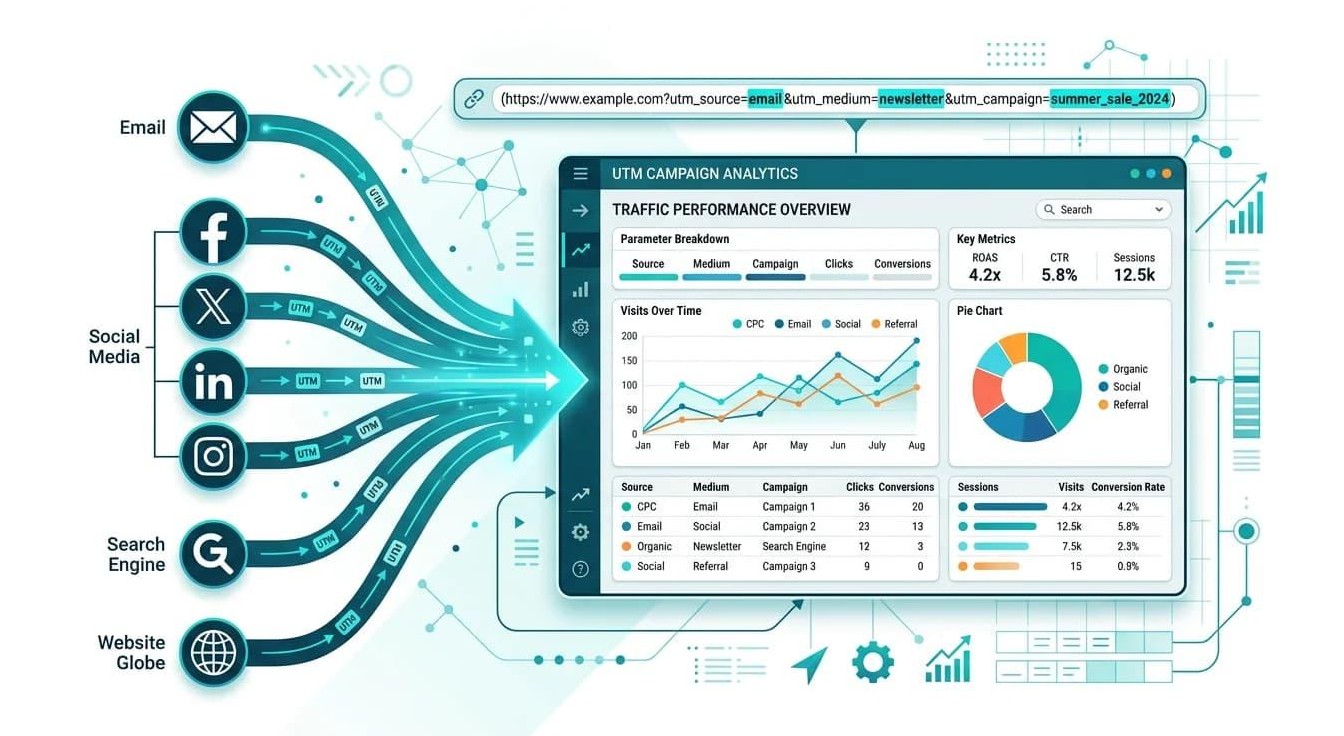
UTM stands for Urchin Tracking Module. It is a set of parameters added to a website URL to identify where website traffic comes from.
For example, you can create separate tracking links for Facebook, email newsletters, and LinkedIn campaigns. When visitors click those links, Google Analytics can collect campaign information.
Five Important UTM Parameters
Here are the main UTM parameters used in campaign tracking:
- utm_source: Identifies the traffic source, such as facebook or newsletter.
- utm_medium: Identifies the marketing medium, such as social, email, or cpc.
- utm_campaign: Identifies the campaign name.
- utm_term: Helps identify paid search keywords.
- utm_content: Differentiates ads or links within the same campaign.
You do not need to use all five parameters every time. The source, medium, and campaign parameters are the most commonly used.
How to Create a UTM Tracking Link
Let’s say you are promoting a digital marketing course on Facebook.
Your original website URL might be:
https://example.com/digital-marketing-course/
A campaign tracking URL could look like this:
You can create similar links for different platforms and campaigns.
Google’s Campaign URL Builder can help you generate these URLs without manually writing every parameter.
How to Track UTM Campaigns in Google Analytics 4
After creating your tracking links, connect your website to Google Analytics 4.
Follow these steps:
- Sign in to your Google Analytics account.
- Select your website property.
- Open the Reports section.
- Navigate to Acquisition.
- Open Traffic Acquisition.
- Review the traffic source, medium, and campaign information.
When visitors arrive through correctly tagged links, GA4 can report campaign information.
Remember that data may take some time to appear, and incorrect or inconsistent UTM naming can make reports difficult to understand.
Common UTM Tracking Mistakes
Avoid these common mistakes:
- Using different spellings for the same traffic source.
- Creating campaign names without a clear naming system.
- Adding unnecessary parameters.
- Forgetting to tag important campaign links.
- Using UTM parameters on internal website links.
- Sharing incorrect or broken tracking URLs.
For better reporting, use lowercase names and maintain a consistent campaign naming convention.
How UTM Tracking Improves Marketing Decisions
UTM tracking helps you understand which campaigns bring visitors and which sources contribute to your marketing goals.
For example, you may discover that Facebook brings more visitors, while email campaigns generate more enquiries.
This information can help you improve your campaign strategy, allocate your advertising budget, and focus on channels that perform better.
Frequently Asked Questions
Is UTM tracking free?
Yes. Creating UTM links is free, and you can use Google Analytics 4 to analyze the collected campaign data.
Does UTM tracking work with Facebook Ads?
Yes. You can add UTM parameters to Facebook Ads URLs to identify campaign traffic in GA4.
How long does it take for UTM data to appear in GA4?
Some information may appear in real-time reports, while standard reports can take longer to process.
Should I use UTM links for every social media post?
Use them when you want to measure traffic from specific campaigns, promotional posts, or marketing activities.
Final Thoughts
UTM tracking and Google Analytics 4 provide valuable insights into digital marketing performance. Instead of relying only on likes, clicks, or assumptions, you can analyze where visitors come from and how your campaigns perform.
Start with a simple naming system, create properly tagged links, and review your GA4 reports regularly. Better tracking leads to better-informed marketing decisions.